2.0 - Configuration and Basic Concepts
2.1 - Introduction to Ansible Configuration Files
[defaults]

inventory = /path/to/inventory/file # e.g. /etc/ansible/hosts
log_path = /path/to/log/file # e.g. /var/log/ansible.log

library = /path/to/modules/folder # e.g. /usr/share/my_modules/
roles_path = /path/to/roles/folder # e.g. /etc/ansible/roles
actions_plugins = /path/to/action/plugin # e.g. /user/share/ansible/plugins/action

gathering = implicit # how ansible gathers facts

## SSH Timeout
timeout = 10
forks = 5 # how many hosts can ansible target at any given point

[inventory]

enable_plugins = plugin1, plugin2, plugin3, ...

[privilege_escalation]

[paramiko_connection]

[ssh_connection]

[persistent_connection]

[colors]
- Ansible will, unless specified otherwise, refer to this configuration when any playbook is ran on the control machine.
- This isn't mandatory, one can define specific configuration files for specific playbooks based on use cases, make a copy of the config file in the playbooks directory(ies), and make the changes accordingly.
- Upon execution, any config file in the playbook's directory will take precedence over the default.
-
If the config file is to be stored away from the playbook directory, add the environment variable
$ANSIBLE_CONFIG=/path/to/fileprior to anyansible-playbookcommand. -
In terms of precedence, config files specified by
$ANSIBLE_CONFIGwill take top priority, then any cfg in the playbook's directory, then.ansible.cfgin the user home directory, and finally/etc/ansible/ansible.cfg. -
Note: The cfg files outside of the default location do not have to have every single parameter defined, only the ones which you wish to override.
-
In the event of only one or two variables needing to be overwritten, one could add
ANSIBLE_<CONFIG PARAMETER NAME>=valueprior toansible-playbookexecution. - This would take top priority, but does not persist command to command.
- One could
exportthe variable to persist in the shell. -
To persist outright across shells, it's advised to create a new
ansible.cfgfile in the desired location. -
To understand the configurations available and default values, use
ansible-config list. - To view the current config file:
ansible-config view - To view the current settings and where the settings are set from e.g. environment variables:
ansible-config dump
04.1 - Introduction to YAML
- All Ansible Playbooks are written in YAML
- Text or Configuration files
- Analagous to the likes of JSON and XML, YAML is just another way of representing data
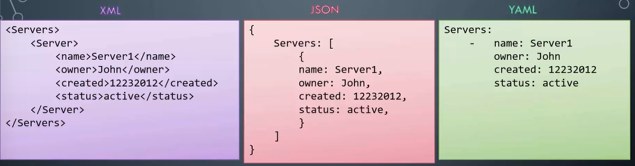
- Generally, data is presented in key-value pairs i.e.
- Key-Value Pair:
- Arrays:
-indicates an element of an array
- Dictionaries:
- All entries in a particular dictionary offset by a set amount of spaces.
- Spacing determines what data is a property of which, any values that are child properties of a particular parent must have the same amount of spaces before definition.
- Note:
- You may have a need to store different sets of information for a particular "thing".
- Dictionary within dictionaries are used for using multiple values of different types
- Arrays used for different values of the same types
-
Use a list of dictionaries for storing the same set of information for multiple entries of similar nature. In the example below, each element in the array is in fact a dictionary.
-
When to use dictionaries v lists:
- Dictionary = Unordered data
-
List = Ordered
Exercises
- Given a dictionary with the property
property1and valuevalue1
Add an additional property property2 and value value2.
1.
Given a dictionary with the property name and value apple. Add additional properties to the dictionary.
| Key/Property | Value |
|---|---|
| name | apple |
| color | red |
| weight | 90g |
1.
A dictionary employee is given. Add the remaining properties to it using information from the table below.
| Key/Property | Value |
|---|---|
| name | john |
| gender | male |
| age | 24 |
- Now try adding the address information. Note the address is a dictionary
| Key/Property | Value |
|---|---|
| name | john |
| gender | male |
| age | 24 |
| address | Key/PropertyValuecityedisonstatenew jerseycountryunited states |
employee:
    name: john
    gender: male
    age: 24
address:
city: edison
state: new jersey
country: united states
- Given an array of apples. Add a new apple to the list to make it a total of 4.
- add two more
- add two mangoes to the list
1.
We would like to add additional details for each item, such as color, weight etc. We have updated the first one for you. Similarly modify the remaining items to match the below data.
| Fruit | Color | Weight |
|---|---|---|
| apple | red | 100g |
| apple | red | 90g |
| mango | yellow | 150g |
-
    name: apple
    color: red
    weight: 100g
- name: apple
  color: red
  weight: 90g
- name: mango
  color: yellow
  weight: 150g
- We would like to record information about multiple employees. Convert the dictionary
employeeto an arrayemployees
- Add an additional employee to the list using the below information.
| Key/Property | Value |
|---|---|
| name | sarah |
| gender | female |
| age | 28 |
1.
Now try adding the pay information. Remember while address is a dictionary, payslips is an array of month and amount
| Key/Property | Value |
|---|---|
| name | john |
| gender | male |
| age | 24 |
| address | ... |
| payslips | #monthamount1june14002july24003august3400 |