1.3 - The Tanzu CLI
Objectives
- Describe Tanzu CLI
- List requirements for a bootstrap machine
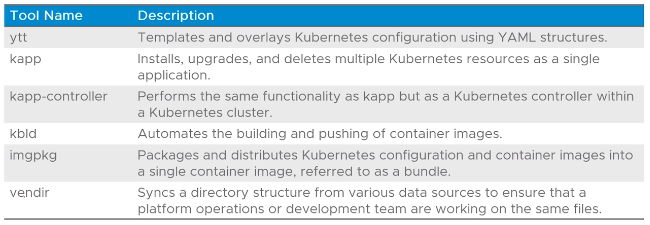
- Describe the Carvel Tool Set
Tanzu CLI
- Available on all major OS (Windows/Linux/Mac OS)
- Used to interact with different products in the VMWare Tanzu Portfolio
- Used with Tanzu Kubernetes Grid to:
- Initialize a Tanzu Kubernetes Grid Instance
- Create, scale, upgrade, and delete Tanzu Kubernetes clusters
Tanzu CLI Plugins
- Each product associated with Tanzu makes up a plugin that works with the Tanzu CLI
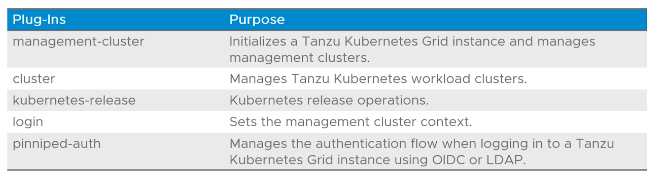
Installing Plugins
- Various methods available:
- From the internet:
tanzu plugin install <plugin name>
- From a local directory:
tanzu plugin install <plugin name> --local <dir>
- All available plugins:
tanzu plugin install all |--local <directory>|
Tanzu CLI Syntax
- General syntax format:
tanzu <resource> |<sub-resource>| <verbs> --<options>
- Examples:
tanzu management-cluster gettanzu cluster create --file </path/to/file.yaml>tanzu cluster listtanzu cluster get <cluster name>tanzu cluster kubeconfig get --admintanzu kubernetes-release get
CLI Configuration Files
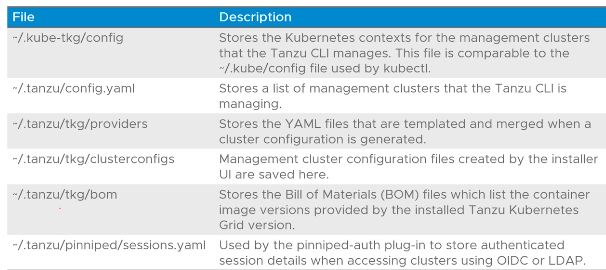
- The following CLI configuration files are created via the Tanzu CLI:
- TLDR:
- config - stores Kubernetes contexts for management clusters managed by the Tanzu CLI
- config.yaml - List of management clusters managed by the Tanzu CLU
- providers - Sores YAMLs templated and merged when cluster configuration is generated
- clusterconfigs - management cluster configuration files created by the installer UI
- bom - Bill of Materials files - list container image versions provided by installed TKG version e.g Pod images
- sessions.yaml - used by pinniped-auth plugin to store authenticated session details when accessing clusters.
Bootstrap Machine Requirements
- as this is where a Tanzu Kubernetes Grid instance will be initialized, there are prerequisites:
- Kubectl must be installed
- Docker must be installed (CLI for Linux), Desktop for Mac or Windows
- Minimum 6Gb memory for the containers used during the bootstrapping process
- IP network connectivity to the vCenter Server instance and the network where the management cluster is to be deployed.
Installer Interface
- The TKG installer interface is a GUI wizard that guides the configuration of a management cluster.
- To start it up:
tanzu management-cluster create --ui
- First step to select IaaS system e.g. vSphere, AWS, Azure
- A collection of CLI tools that help in building, configuring and deploying Kubernetes/Kubernetes-based workloads