4.0 - Ansible Variables
7.1 - Ansible Variables
Introduction
- Variables are used in a very similar manner to other programming / scripting languages.
- Could be used to allow changeability of username / host details.
- Ansible inventory files can be the prime point for variables
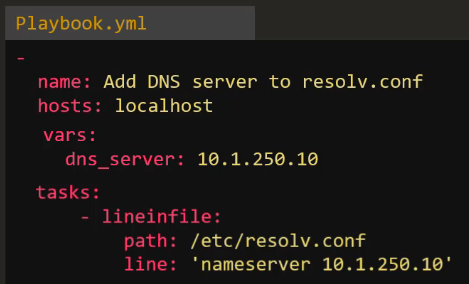
- Variables can be added in playbooks in a similar manner to:
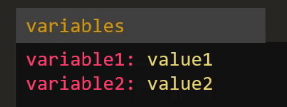
- Alternatively, they can be included in a separate variables file and referenced by "incudes" functions, more on that in a later section:
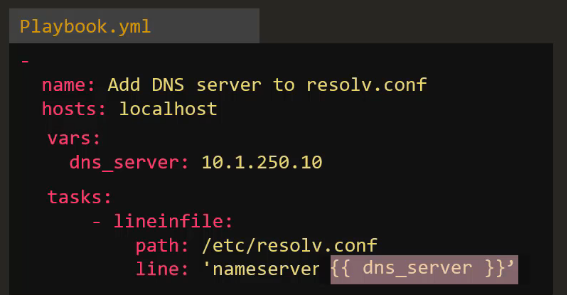
Using Variables
- To use variables, enter the variable name in ‘{{}}' i.e.
- Example two - using inventory file playbooks. variable yaml files etc:
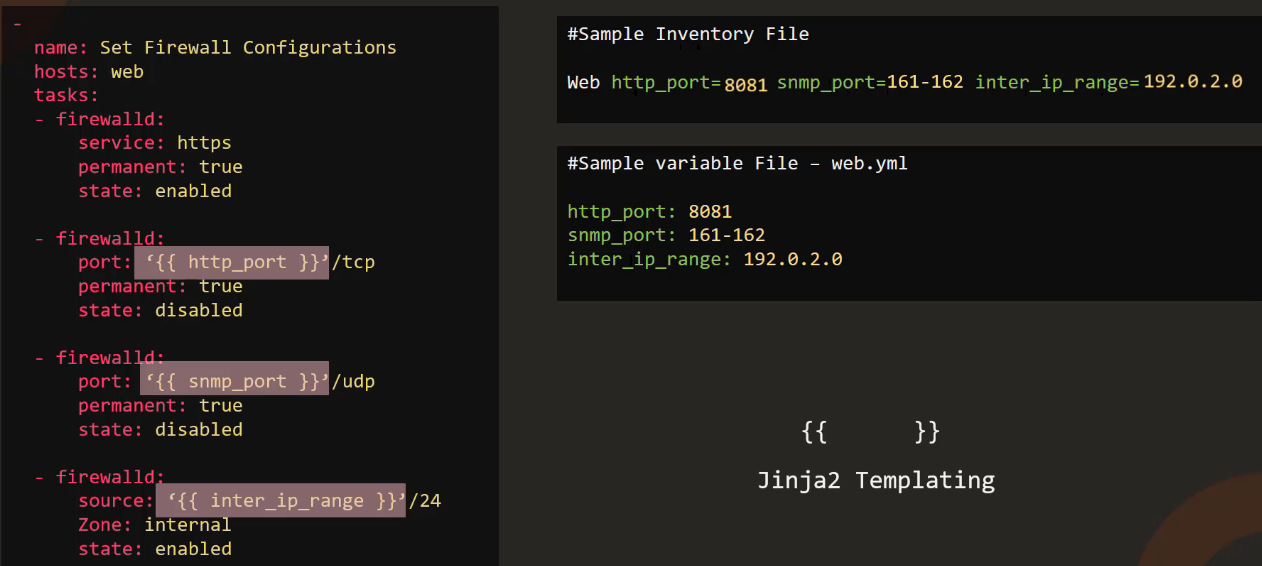
- Note - This is Jinja Templating!
07.2 - Coding Exercise: Ansible Variables
Q1
The playbook is used to update name server entry into resolv.conf file on localhost. The name server information is also updated in the inventory file as a variable nameserver_ip. Refer to the inventory file.
Replace the ip of the name server in this playbook to use the value from the inventory file, so that in the future if you had to make any changes you simply have to update the inventory file.
 -
    name: 'Update nameserver entry into resolv.conf file on localhost'
    hosts: localhost
    tasks:
        -
            name: 'Update nameserver entry into resolv.conf file'
            lineinfile:
                path: /etc/resolv.conf
                line: 'nameserver {{ nameserver_ip }}'
Q2
We have added a new task to disable SNMP port in the playbook. However the port is hardcoded in the playbook. Update the inventory file to add a new variable snmp_port and assign the value used here. Then update the playbook to use value from the variable.
Remember to use curly braces around the variable name.
-
    name: 'Update nameserver entry into resolv.conf file on localhost'
    hosts: localhost
    tasks:
        -
            name: 'Update nameserver entry into resolv.conf file'
            lineinfile:
                path: /etc/resolv.conf
                line: 'nameserver {{ nameserver_ip }}'
        -
            name: 'Disable SNMP Port'
            firewalld:
                port: '{{ snmp_port }}'
                permanent: true
                state: disabled
Q3
We are printing some personal information to the screen. We would like to move the car_model, country_name and title to a variable defined at the play level.
Create three new variables (car_model, country_name and title) under the play and move the values over. Use the variables in the task.
-
    name: 'Update nameserver entry into resolv.conf file on localhost'
    hosts: localhost
    vars:
      car_model: BMW M3
      country_name: USA
      title: Systems Engineer
    tasks:
        -
            name: 'Print my car model'
            command: 'echo "My car''s model is {{ car_model }}"'
        -
            name: 'Print my country'
            command: 'echo "I live in the {{country_name}}"'
        -
            name: 'Print my title'
            command: 'echo "I work as a {{title}}"'
4.3 - Variable Types
String
- Sequences of characters that can be defined in a playbook, inventory, or as CLI arguments.
- Example:
username: "admin"
Number
- Integer or floating-point values. May be set as standalone values or used in mathematical operations.
- Example:
max_connections: 100
Boolean
- True or False, typically used in conditionals.
- Example:
debug_mode: true - True/False are not the only accepted values for
TrueorFalseto be registered: TruthyValues: True, 'true', 't', 'yes', 'y', 'on', '1', 1, 1.0FalsyValues: False, 'false', 'f', 'no', 'n', 'off', '0', 0, 0.0
List
- Used to hold an ordered collection of values, the values must all be of the same type, but any value type is supported by lists themselves
- Example:
packages:
- nginx
- git
- terraform
...
- Specific list values can be referred to via
{{ <list name>[item index] }} - Note: The first element is always index
0. - Lists themselves can then be referred to via loops - refer to section 5.7 for further details.
Dictionary
- Holds a collection of key-value pairs.
- Keys and values can be any values.
user:
  name: "admin"
  password: "secret"
- Dictionary values can be referred to via
{{ <dictionary name>.<key name> }}
4.4 - Registering Variables and Varoiable Precedence
Variable Precedence
- If variables are defined in multiple places, the order of priority they are registered is variable precedence.
- In practice, Ansible will first assign variables defined at the group level, any vars defined at host level will then be applied or overwrite values as appropriate.
- Host variables therefore take precedence over group variables.
- Any variables defined at playbook level and then at CLI level take precedence.
- So, in order of precedence, Ansible applies variables in the following order:
- Group Vars
- Host Vars
- Playbook Vars
- CLI vars (via
--extra-varsflag) - Additional options are available, however the above are the 4 more common methods.
Registering Vars
- You may wish to capture the output of a particular task and pass it in as a variable to a follow-on task. This can be achieved via the
registerparameter.
- name: Check /etc/hosts file
  hosts: all
  tasks:
  - shell: cat/etc/hosts
    register: result # output of shell command stored as variable "result"
  - debug:
      var: result
- The output can be further queried for specific values as it is in
jsonoutput. -
Example:
var: result.stdout -
Any variable created via
registeris available for the rest of the playbook for that given host; it has the host scope. - Note: To avoid using the debug module, append the
-vflag to the desiredansible-playbookcommand.
4.5 - Variable Scoping
Introduction
- Scope = How accessible a variable's value is.
- For example, if one host in a particular inventory file has an extra parameter set, that value is not available to the other hosts.
-
Multiple scopes are available in ansible to deal with varying scenarios.
-
Host:
-
A variable defined as a host variable, and is only accessible in a play(s) on that specific host.
-
Play:
-
Variables defined at play-level and cannot be referenced by any other plays.
-
Global:
- Variables available across all plays, these are typically variables defined at CLI levels via
--extra-vars "<var name>=<var value>
4.6 - Magic Variables
Hostvars
- As discussed in previous sections, variables are scoped depending on where they are defined. If defined at a host level, host 2 traditionally has no access to variables defined for host 1, etc.
- If this did become a requirement, Magic Variables can be utilised.
- Used in the form
'{{ hostvars['<hostname>'].<var name> }}' - If additional facts are gathered by the hosts, vars such as the following can be used:
- Host IP Address:
ansible_host - Host system architecture:
ansible_facts.architecture -
Host mounts:
ansible_facts.mounts -
Note: Magic variables may also be referred to via:
'{{ hostvars['<hostname>'][<var/var group name>][<sub-variable name>] }}'
Groups
- Group magic variables can be utilised in a few ways:
'{{ groups['<group_name>'] }}'returns all the hosts under the particular group. '{{ group_names }}'will return the names of any group the particular host finds itself in.
Inventory
'{{ inventory_hostname }}'gives the inventory-level name for the host the play is running on.
- Other examples are available via the Ansible documentation.
4.7 - Ansible Facts
Introduction
- Ansible gathers basic facts about the target machine upon initial connection, such as:
- basic system information
- system architecture
- architecture
- network connectivity
- ip addresses
- storage information
- Ansible gathers all these
factsvia thesetupmodule, which is ran automatically at the start of each playbook, unlessgather_factsis disabled. - All facts gathered by ansible are stored in the
ansible_factsvariable. This can be viewed via thedebugmodule, passingansible_factsas the var. - Gathering facts can be disabled at playbook level by setting
gather_facts: no, or at config level by settinggathering = implicit/explicit - At config level, implicit will gather facts by default, unless specified not to at playbook level.
- Explicit will not gather facts by default, unless specified otherwise at playbook level.
- Playbook-level configuration always takes precedence.
- Fact-gathering only applies to hosts defined in inventory files.