Getting Started with Argo CD
1.0 - Introduction
1.1 - Containers and Kubernetes Overview
Containers
- An abstraction of the application layer in an isolated user-space instance
- Share the OS Kernel Storage and Networking from the host they run on
- Can be thought of like the core components needed for an application running as a process.
- Allow the packaging of an application and its dependencies in one instance.
- Allows engineers to develop applications into a repeatable and lightweight manner.
-
Allows applications to integrate more easily with CI/CD pipelines, providing greater flexibility and agility.
-
Because the containers share the OS Kernel storage, etc. and do not require a hypervisor or leverage a guest operating system, they are more lightweight and easier to deploy than virtual machines.
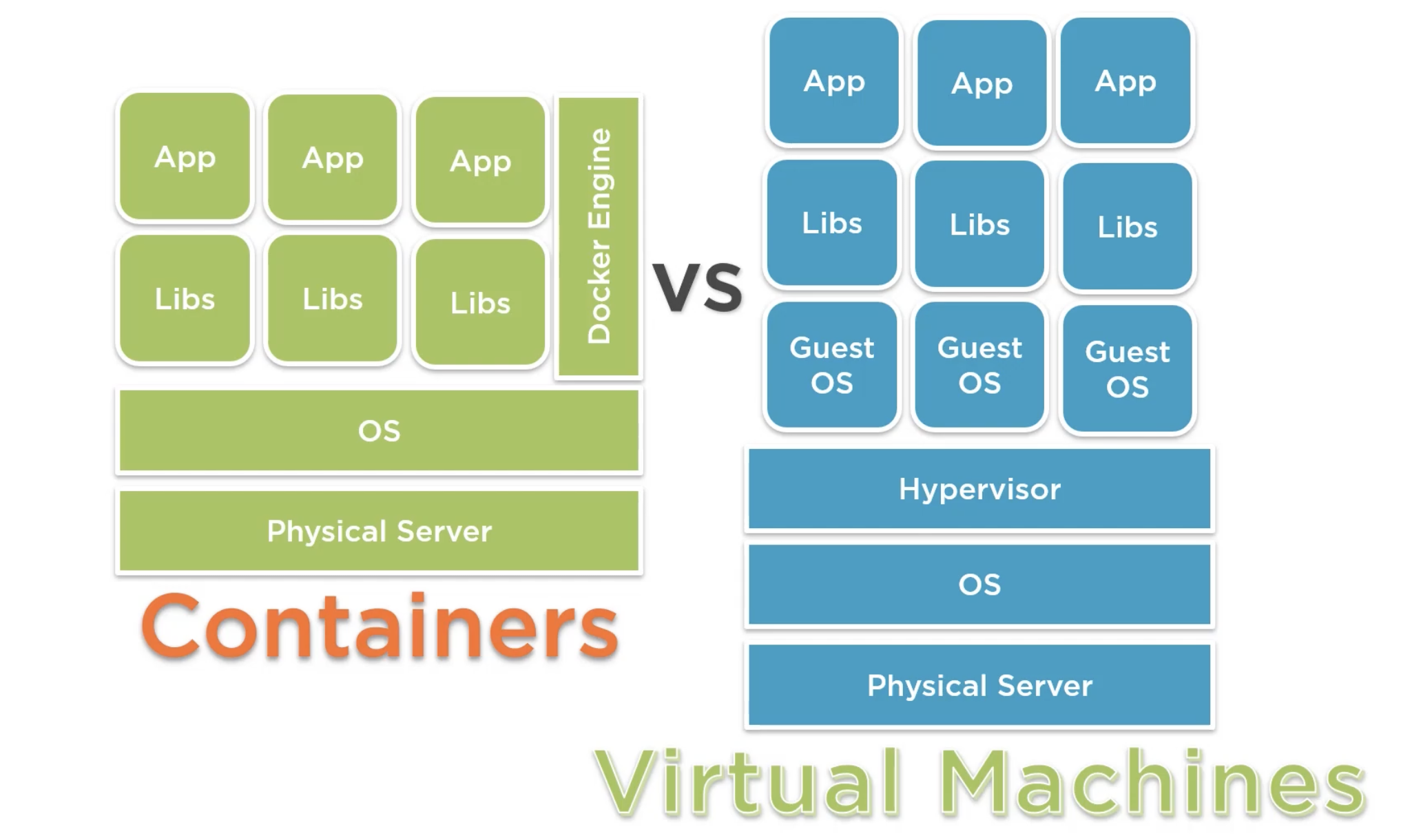
- If using Docker as the container runtime, common commands include:
- Login to Dockerhub:
docker login localhost - Run a hello world container:
docker run hello world
Kubernetes
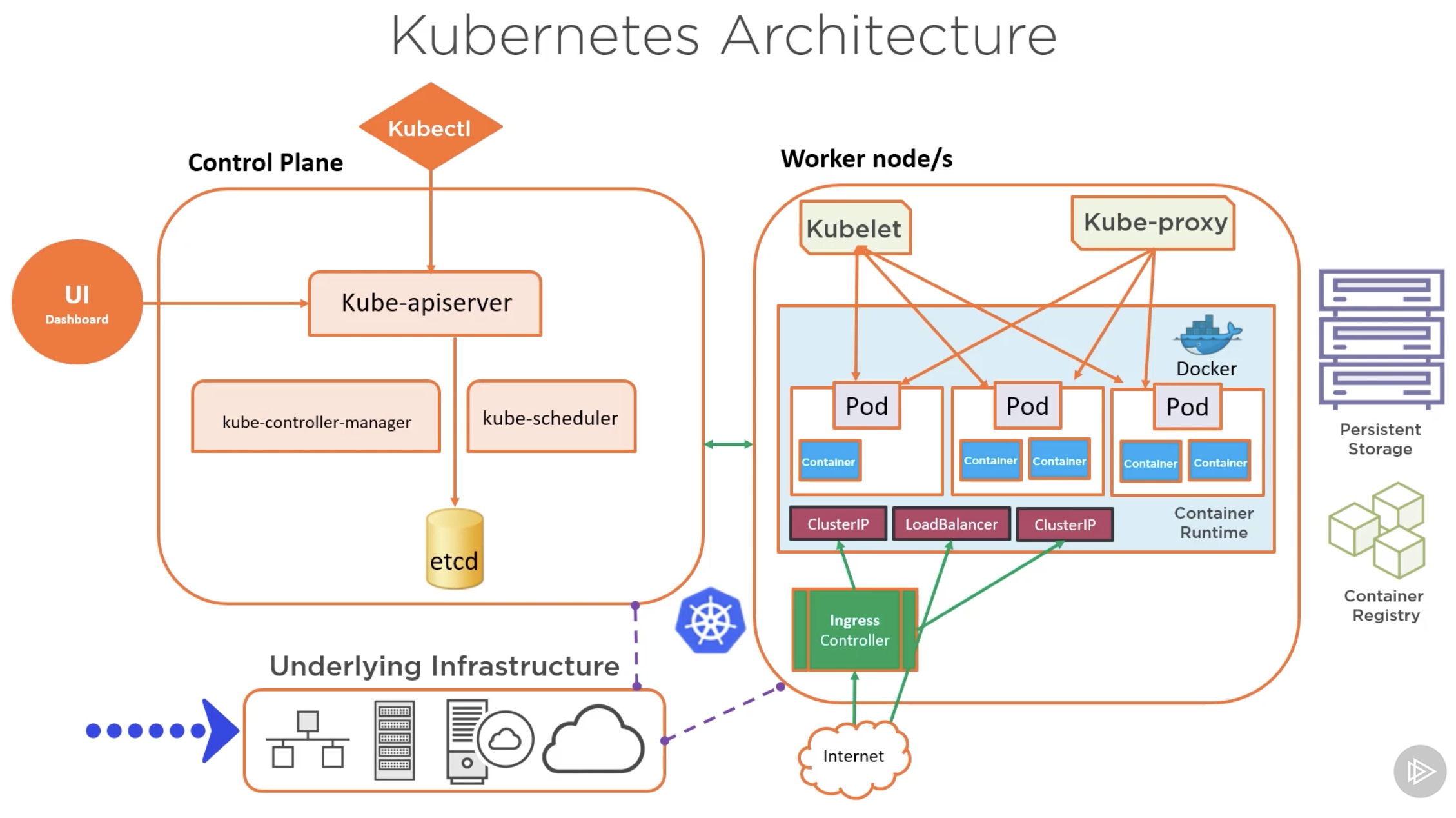
- Open-source container orchestration platform.
- Used to automate, deploy, manage and scale workloads
- Abstracts the complexity of a multi-container environment
- Combines compute, networking and storage components that hundreds (or more) containers rely on.
- Works on a declarative management model - users describe the desired configuration for deployment.
- It's this which ArgoCD aims to enforce.
1.2 - Helm and Kustomize Overview
Helm
- Package manager for Kubernetes - apps are packaged into charts for deployments
- A deployment tool for automating creation, pacakging, configuration and deployment of apps and configurations to Kubernetes clusters.
Kustomize
- A standalone tool to customize the creation of Kubernetes objects through a file called
kustomization.yaml - A template-free way to customize application configuration that is built into kubectl.
- Traverses a Kubernetes manifest to add, remove or update configuration options without forking or actual YAML files.
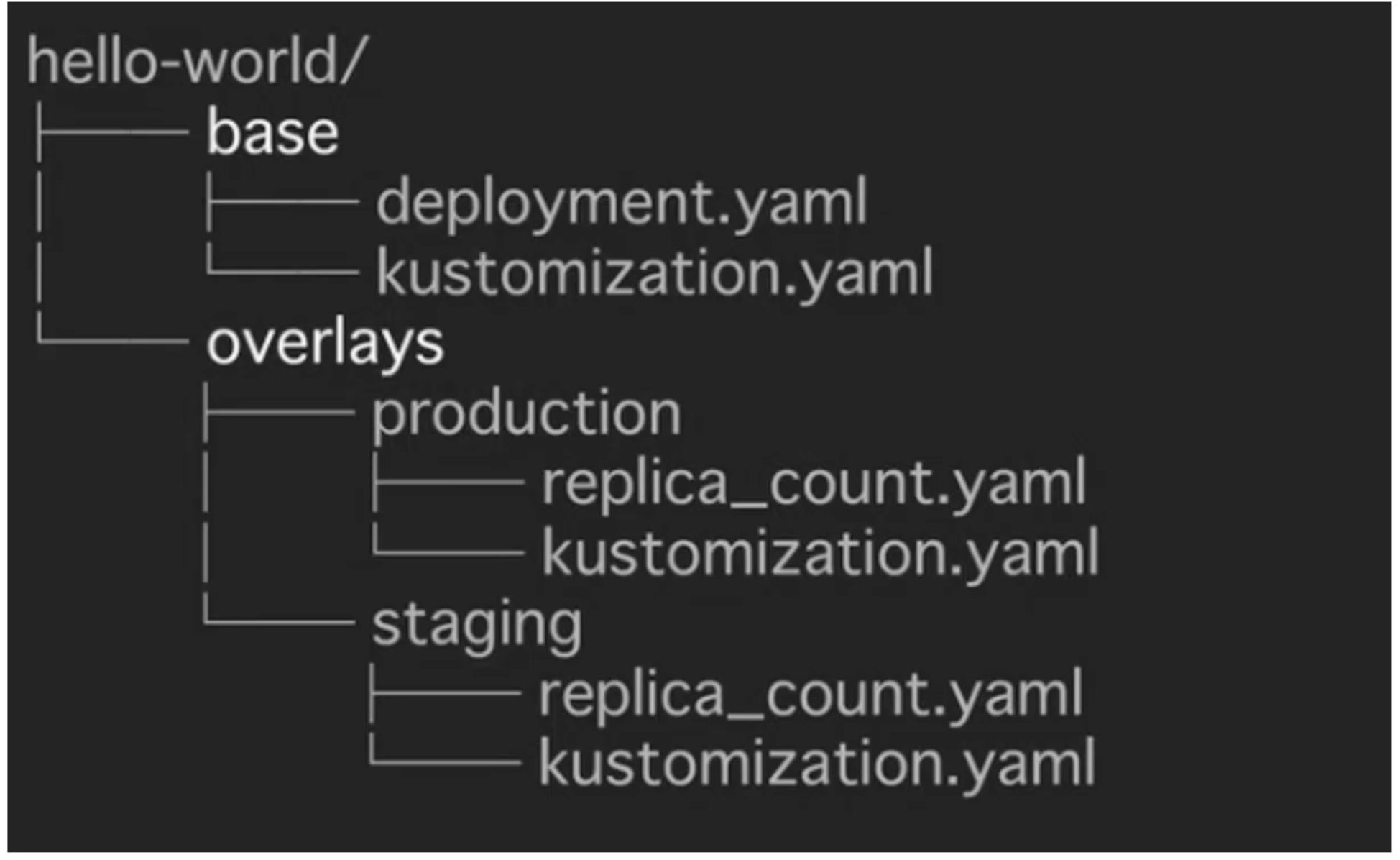
Kustomize Structure:
- kustomization.yaml
bases:
  - ldap
patches:
  - patch.yaml
...
- base - ldap
apiVersion: v1beta2
kind: Deployment
metadata:
  name: ldap
  labels:
    app: ldap
spec:
  replicas: 1
  selector:
    matchLabels:
      app: ldap
  template:
    metadata:
      lables:
        app: ldap
  spec:
    containers:
    ...
    volumes:
    ...
- patch.yaml - staging
apiVersion: apps/v1beta2
kind: Deployment
metadata:
  name: ldap
spec:
  replicas: 2
- patch.yaml - prod
apiVersion: apps/v1beta2
kind: Deployment
metadata:
  name: ldap
spec:
  replicas: 6
  template:
    spec:
      volumes:
        - name: ldap-data
          emptyDir: null
- Sample folder structure:
1.3 - GitOps Core Concepts
- GitOps:
- An operating model pattern for cloud native and Kubernetes-based applications
-
Declarative infrastructure code in Git is used as the single source of truth for automated continuous delivery.
-
GitOps Principles
- Git acts as the source of truth for the entire system
- The desired system state is versioned in Git
- System state is described declaratively
- Git is the single place for operations, such as create, change and delete
- Autonomous Agents enforce the desired state, and alert on drift - ArgoCD is an example of this
-
Delivery of approved system state changes is done so in an automated manner
-
GitOps Architecture Components:
- Source control system (GitHub, GitLab, etc.)
- Git repository
- Container / Helm registry
- Operator e.g. Flux, ArgoCD
- Runtime Environment e.g. Kubernetes Cluster(s)
-
Namespaces - could be per environment, per app, service, build, etc.
-
Use Cases:
- Cloud Native App Management i.e. CD
- Service Rollouts
-
Infrastructure management e.g. clusters and microservices
-
GitOps Operators Examples:
- Flux
- ArgoCD
- Kubestack
1.4 - ArgoCD Overview
- Argo Project supports 4 main solutions:
- Argo Workflows - A workflow engine for orchestrating parallel jobs in Kubernetes
- ArgoCD - A declarative, continuous delivery GitOps operator for Kuberentes
- Argo Rollouts - Supports advanced deployments e.g. blue-green, canary
-
Argo Events - Event-driven workflow automation framework for Kubernetes
-
ArgoCD:
- A GitOps operator that provides continuous delivery for Kubernetes
-
Has application controller to continuously monitor apps running on Kubernetes, comparing the live state to what was defined in the Git repository.
-
Key Features:
- Web UI
- Automated Application Deployment
-
Health Status Monitoring for Apps and associated resources
-
Typical CD Workflow with ArgoCD:
- ArgoCD Operator pulls app configurations from Git repo & deploys the app in a Kubernetes cluster
- New app feature code committed and a pull request is submitted to the git repo to modify app development
- Pull request is merged with new code into the main repo
- ArgoCD Operator does a pull to the Git Repo, acknowledges the changes, and updates the app(s) in the Kubernetes cluster.
1.5 - ArgoCD Core Concepts and Architectures
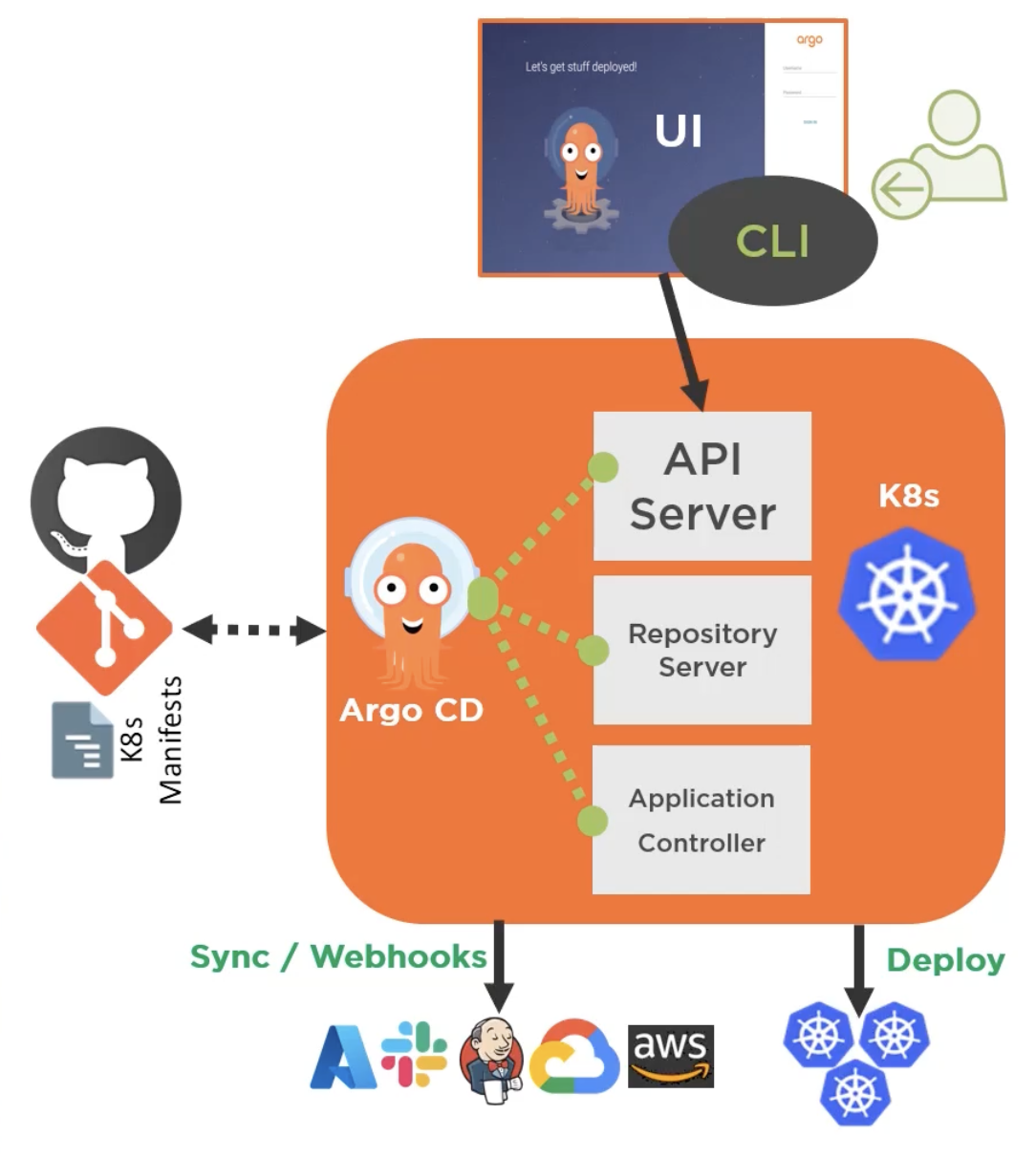
Architecture
- API Server
- A gRPC/REST server that exposes the API consumed by the Web UI, CLI, and CI/CD systems.
- Repository Server:
- Any internal service that maintains a local cache of the git repo holding the app manifests
- Application Controller:
- A kubernetes controller that continuousl monitoers running apps, and compares their current state to that of the desired state.
Components
- argocd-dex-server:
- ArgoCD Embeds and bundles Dex as part of its installation - this delegates authentication to an external identity provider and handling SSO.
- argocd-metrics / argocd-server-metrics:
- Exposes Application metrics and API Server metrics to be scraped by Prometheus
- argocd-redis:
- Used to support caching for working with the ArgoCD repository server
- argocd-repo-server:
- Clones the git repository, keeping it up to date and generating manifests using the appropirate tool
- argocd-server:
- Runs the ArgoCD API Server
1.6 - Supported Tooling with ArgoCD
- ArgoCD supports sever different ways in which Kubernetes manifests can be defined, including:
- Kustomize
- Helm
- Jenkins
-
Jsonnet
-
ArgoCD Tool Detection
- When a new app is created in ArgoCD can detect the tooling used to create the app.
- Example: Helm by checking for a Chart.yaml
- Example: Kustomization by checking for a
kustomization.yamlfile.
2.0 - Installation and Operation of ArgoCD
2.1 - Requirements
- Kubectl needs to be installed
- A kubernetes cluster with:
- Cluster admin level access
- Kubeconfig configured to connect to the cluster
- Access to GitHub (or other source control)
2.2 - Deploying ArgoCD
- Types of installs:
- Non-High-Availability:
- Recommended for dev / testing
- Deploys single pods and replicas for ArgoCD components
- High-Availability:
- Manifest =
namespace-install.yaml - Recommended for prod
- Optimized for high availabiltiy and resiliency
- Multiple replicas for supported components.
- Manifest =
- Core Install:
- Used typically when multi-tenancy features like web UI and API aren't required
- Installs the non-HA version of each component
- Cluster Level:
- Use when you have cluster level access and will deploy apps in the saem K8s cluster that ArgoCD will run on
- Namespace-Level:
- Use when you have namespace-level access and will deploy apps to external K8s cluster from where ArgoCD is running.
Installation
- Create a namespace for ArgoCD:
kubectl create namespace argocd -
kubectl apply -n argocd -f <link to install.yaml> -
Note: Other methods of installation are available e.g. Helm.
2.3 - Accessing ArgoCD API Server
- 2 Ways:
- Access the WebUI
- Utilise the ArgoCD CLI.
2.4 - Using the ArgoCD CLI
- Certain activities can only be performed via the ArgoCD CLI in comparison to the UI, such as:
- Adding clusters
- Managing user accounts
- The CLI supports scripting and AUTOMATION
ArgoCD Installation
- Windows:
choco install argocd-cli - Linux and Mac:
brew install argocd\
Common Commands
| argocd command | Description |
|---|---|
| login | Login to API Server |
| account | Manage API Server Account |
| proj | Manage projects |
| app | Manage applications |
| repo | Manage repos used by ArgoCD |
| version | Check the argocd CLI version |
| argocd-util | Provides access to utilities to manage argocd e.g. import/export data |
| cluster | Manage cluster operations |
2.5 - Upgrading ArgoCD
- ArgoCD follows the standard semantic versioning
<MAJOR>.<MINOR>.<PATCH>
2.6 - Setting Up RBAC for ArgoCD
- ArgoCD doesn't have RBAC enabled by default. When enabled, it facilitates restriction of access to ArgoCD Resources
- As ArgoCD doesn't have its own user management system, it requires SSO configuration for local setup:
- Solutions such as Azure AD or Okta recommended for larger teams
- More RBAC roles beyond the defaults can be defined upon setup, which can then be assigned per user / group.
Default Roles:
readonly: Provide read-only access to all resourcesadmin: unrestricted access to all resources
ArgoCD RBAC - Resources & Actions:
- Resources: Clusters, projects, applications, repositories, certificates, accounts, gpgkeys
- Actions: get, create, update, delete, sync, override, action
ArgoCD RBAC - Permissions
- Split into two caregories:
- All resources except applications:
p, <role/user/group>, <resource>, <action>, <object> -
Applications (tied to an AppProject):
p, <role/user/group>, <resource>, <action>, <appproject>/<object> -
These permissions and roles are typically defined in configmaps, where user groups are chosen by
g, <group name>
2.7 - Configuring User Management
- By default ArgoCD has only one user created (admin)
- For new users there are 2 options:
- Local users - Recommended for small teams 5 or less, as well as usage of API Accounts for automation.
- SSO Integration - Recommended for larger teams & integrating with external identity providers.
Local Users
- Stored in a ConfigMap that is applied to ArgoCD
- Lack access to advanced features e.g. groups, login history, etc.
- Each new user requires assignment to
readonlyoradminrole, the two built-in roles. - Each new user will also need policy rules defined, or they will default to
policy.default - New users are created in a ConfigMap named
argodc-cm - Users can have capabilities assigned:
apiKey- allows generation of api keyslogin- allows login via the UI- User management is only achievable via the CLI:
- Get users:
argocd account list - Get user details:
argocd account get --account <USERNAME> - Set user password:
argocd account update-password
SSO Integration
- Also handled in the
argocd-cmConfigMap - ArgoCD handles SSO via one of 2 options:
- Dex OIDC Provider - Used when your standard identity provider doesn't support OIDC e.g. SAML or LDAP
- Existing OIDC providers such as:
- AuthO
- Microsoft
- Okta
- OneLogin
- KeyCloak
2.8 - Setting Up Secrets Management
- ArgoCD never returns sensitive data from its API, and redacts all sensitive data in API payloads and logs, including:
- Cluster credentials
- Git credentials
- OAuth2 client secrets
- Kubernetes Secret values
- ArgoCD stores the credentials of the external cluster as a Kubernetes Secret in the argocd namespace
- The secret contains the K8s API bearer token associated with the
argocd-managerservice account created during the argocd setup. - Secret management functionality isn't built-into ArgoCD by default, a third-party solution is required e.g.:
- HashiCorp Vault
- Helm Secrets
- aws-secret-operator
- argocd-vault-plugin
2.9 - HA, Backup and Disaster Recovery
- ArgoCD is made up of mostly stateless components
- For any data in ArgoCD that needs to persist, it is written to the etcd kubernetes database
- Redis in ArgoCD is designed as throwaway cache that will be thrown rebuilt when lost.
- Alternatively, ArgoCD can be deployed in a high-availability mode.
High-Availability
- Requires at least 3 different nodes for pod anti-affinity roles
- Specific High-Availability Manifests required for deployment
- Deploys more replicas of standard ArgoCD components and Redis in HA mode.
- Comprised of two main YAML manifests:
ha/install.yaml- Deploys multiple replicas for supported ArgoCD components. Typically used when you have cluster-level access and will deploy apps in the same cluster that ArgoCD runs on.ha/namespace-install.yaml- Deploys multiple replicas for supported ArgoCD components. Typically used when you have naespace-level access and will deploy apps to external clusters from where ArgoCD is running.
Backup and Disaster Recovery
- Facilitated by
argocd admincommand, which supports data import and export operations: argocd admin export > backup.yamlargocd admin import -< backup.yaml
2.10 - Monitoring and Notifications
- API server supports webhooks and can be configured to receive webhook events instead of polling a given Git repository
- ArgoCD supports Git webhook notification from standard Git source control tools like GithUB and GitLab.
2.11 - ArgoCD Monitoring
- Two sets of Prometheus metrics are exposed: API Server Metrics, and Application Metrics
- ArgoCD has a built-in health assessment that is surfaced up to the overal Application health status.
- Status determined by health checks on standard K8s types e.g.:
- Deployments
- Service
- Ingress
- PersistentVolumeClaim
API Server Monitoring
- Looking for API Server metrics, scraped to:
argocd-server-metrics:8083/metrics - Metrics are mostly associated with requests made to the API Servers, including:
- Request Totals
- Response codes
App Monitoring
- Metrics scraped to
argocd-metrics:8082/metricsincluding: - Gauge for application health status
- Gauge for application sync status
- Counter for application sync history
ArgoCD Notifications
- Notification functionality is not built in natively to ArgoCD, alternatives are advised e.g.:
- ArgoCD Notifications: An open-source notification system that monitors ArgoCD applications, it integrates with Slack, Discord, etc.
- Argo Kube Notifier
- Kube Watch
3.0 - Deployment and Management of Applications
3.1 - Register a Kubernetes Cluster with ArgoCD
- By default with an ArgoCD deployment, the cluster it is running on is set as "in-cluster" ->
https://kubernetes.default.svc - When apps are deployed, you deploy them to the "in-cluster" Kubernetes cluster, or to external clusters.
- External clusters must first be registered with ArgoCD, this is achieved via the CLI ONLY, but it can then be modified via the UI.
-
Common commands include:
argocd cluster add- Add a given cluster configuration to ArgoCD, it must exist in thekubectlconfig prior to executionargocd cluster get- Get specific information about a clusterargocd cluster list- List known clusters in a JSON formatargocd cluster rm- Remove a given cluster from ArgoCD managementargocd cluster rotate-auth- Rotate auth token for a cluster
-
Once the cluster is added to the kubeconfig as a context:
- Verify with
kubectl config get-contexts -o name - Add the context to ArgoCD, installing a service account
argocd-managerto that context'skube-systemnamespace viaargocd cluster add <context name>
3.2 - Setting Up Projects in ArgoCD
- Projects: A logical grouping of apps in ArgoCD
- Projects serve multiple purposes including:
- Restrict what Git repos can be deployed from
- Restrict what clusters and namespaces can be deployed to
- Restrict the kinds of objects that can be deployed
- Define project roles, providing app RBAC
- Typically used when ArgoCD is required by multiple teams
- All applications must belong to a project.
- During initial setup, a "Default Project" is created automatically. Any apps created will be assigned to this if no other projects exist.
- The default project allows deployments from any source Git repo to any cluster for all resource types.
- Projects can be created and managed by the web UI or the CLI.
- For the CLI:
argocd proj create <project name> ... <parameters> - Common commandsL
argocd proj listargocd proj getargocd proj deleteargocd proj add-destinationargocd proj add-sourceargocd proj allow-cluster-resourceargocd proj allow-namespace
3.3 - Using Repositories with ArgoCD
- ArgoCD can connect to public or private Git repository.
- For private, connection options include HTTP, HTTPS, SSH and the Github App.
3.4 - Deploy an App Using ArgoCD
- Deployment is achievable by either the web UI or CLI
- For deployment, ArgoCD needs to be pointed to the desired specific Git repository, containing any of Kubernetes manifests, Helm chart(s) or Kustomize.
- Typical CLI command:
argocd app create <app name> --repo <github link> --path <path to resources in repo> --dest-server <kubernetes http address> --dest-namespace <namespace name>
App of Apps
- Apps can be created that creates other apps, this is the "App of Apps" pattern - a declaritive deployment of an app that consists of other apps deploying them at the same time.
- Sample App of Apps Architecture (as seen in
argoproj/argocd-example-appson GitHub):
|- chart.yaml
|- templates
|  |- guestbook.yaml
|  |- helm-dependency.yaml
|  |- helm-guestbook.yaml
|  |- kustomize-guestbook.yaml
|- values.yaml
3.5 - Application Sync and Rollback
- Most common sync used = Auto-Sync / Automatic Sync
- ArgoCD applies every object in the application
- It will sync when it detects differences between the Git repo and teh live state in the cluster.
- Alternative Sync Options:
- Selective Sync
- Syncs out-of-sync-resources ONLY
- Sync Windows
- Configurable windows of time when syncs happen
- They can be set to allow or deny
- They can apply to manual and automated syncs
- Schedules are defined in cron format and can be targeted to applications, namespaces, and clusters
- Sync Phases and Waves
- ArgoCD executes a sync operation in 3 phases - pre-sync, sync, and post-sync
- Each phase can have ne or more waves, ensuring certain resources are healthy before subsequent resources are synced.
Rollback
- Rollbacks are typically used when apps aren't healthy, ArgoCD can support this by tracking an application's history and leveraging data cached in Redis.
- For rollbacks to work: Auto-Sync needs to be disabled
- Via the CLI:
argocd app rollback <app name> <history id> [flags]
3.6 - Deleting Applications
- Apps can be deleted from the UI or CLI. 2 Delete options available:
- Non-Cascade Delete - Deletes only the app
- Cascade Delete - Deletes the app and associated resources
- Deletion via CLI:
argocd app delete <app name> --cascade=falseargocd app delete <app name> --cascade
3.7 - Application Health and Status Reporting
- The Web UI provides the most comprehensive way of monitoring the health status of ArgoCD applications
- Breakdowns are avaailable for health status, sync status, etc.
- Application-level breakdowns are also available.
4.0 - Next Steps for Using ArgoCD
Overview
- GitOps is growing at a fast rate and quickly being adopted into DevOps, especially Kubernetes.
- ArgoCD is one of the top operators
- ArgoCD maintains K8s resources within Git - making it the single source of truth for devs, instead of kubectl.
- ArgoCD is a declarative and continuous delivery tool for Kubernetes
- ArgoCD automates deployment and lifecycle management of apps
- ArgoCD supports complex application rollouts such as Blue-Green and Canary
Resources
- ArgoCD Bloc
- The GitOps Book: GitOps and Kubernetes: Continuous Deployment with ArgoCD, Jenkins X, and Flux.
- OpenShift GitOps Blog
- GitOps Conference - The Linux Foundation
-
GitOps eBook: GitOps Cloud-Native Continuous Deployment
-
OpenShift Labs: GitOps Introduction with Argocd
- OpenShift Labs: Multi Cluster Application Deployment
- Deploy ArgoCD In Your Own K8s Environment.